
Appy Weather: Radar & Widgets
Third Culture AppsWeather
3.3652.00 Reviews
- Version
- 2.0.20.1
- Installs
- 100.00K
- Age Rating
- Everyone
Screenshots
Our Review of Appy Weather: Radar & Widgets
 Analysis by Appyee
I judge a weather app by how quickly I can make a useful decision: whether to take a coat, change a route, or wait out a shower. Appy Weather is built around that kind of everyday check, presenting forecasts in a personal, readable style rather than making me dig through dense charts. It’s a free weather app from Third Culture Apps, and its balance of quick summaries and more detailed conditions makes it appealing if you want more than a basic sun-or-rain icon.
Readability, navigation, and the first impression
From the moment I opened Appy Weather, I was greeted by its sleek and modern interface. It’s got this minimalist vibe that makes navigating through the features a walk in the park. No clutter, no confusion—just straight-up weather info delivered in a way that even your grandma would appreciate. And let’s be honest, who doesn’t love a good-looking app? It’s like the app equivalent of a perfectly brewed cup of coffee.
The main benefit of a clean layout is practical: I can scan the forecast without first learning a complicated set of symbols or menus. That matters when I’m checking quickly at a bus stop or while getting ready for work. The app is rated for Everyone, and its straightforward presentation should suit people who prefer plain language and a compact overview. Still, a minimalist screen is not automatically readable for everybody. If you need larger text, high contrast, or a particular screen-reader experience, it’s worth checking how the current version behaves on your own device rather than assuming the uncluttered design covers every need.
A forecast that works as a timeline
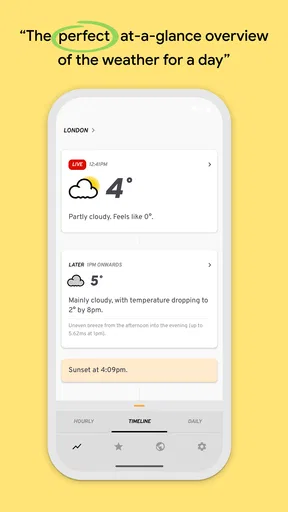
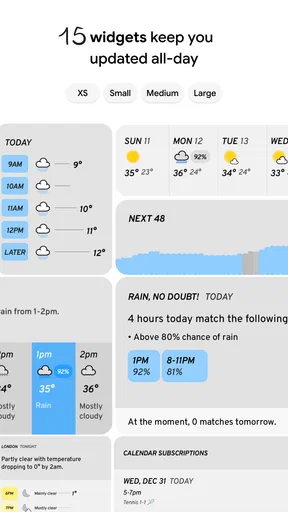
One of the coolest things about this app is its timeline view. It’s like scrolling through your social media feed but for weather updates. You get a concise, hour-by-hour breakdown of what to expect, and it goes beyond just telling you it’ll be sunny or rainy. You get the full scoop on temperature changes, wind speeds, and even humidity levels.
I find that format more useful than a single daily high and low when the timing of a change matters. For example, if I’m deciding whether to walk before dinner, I can look for how conditions are expected to shift through the day instead of treating the whole afternoon as one uniform forecast. It also helps me plan clothing in stages: a mild start does not necessarily mean a comfortable return trip if the wind picks up later.
The timeline is a good middle ground between a basic weather tile and a specialist forecast full of technical charts. It gives enough detail to compare hours, but it does not require me to interpret a meteorologist’s dashboard. If you regularly plan around precise storm movement or need specialist outdoor forecasting, you may still want a dedicated radar or forecasting tool alongside it.
Making “feels like” useful in real life
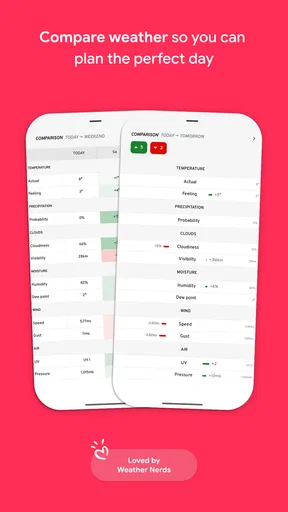
There’s also this neat feature called "Feels Like" temperature. It’s a lifesaver because let’s face it, 60 degrees can feel wildly different depending on the wind and humidity. This feature gives you a more accurate idea of what stepping outside will actually feel like. No more layering up like an onion only to sweat bullets.
I’d use that reading as a clothing cue, not as a promise that every person will experience the air the same way. Someone waiting outdoors, moving slowly, or feeling cold more easily may want an extra layer even when the number seems comfortable. For a short walk, the apparent temperature can be more useful than the headline temperature; for a long cycle or a physically demanding outing, wind and changing conditions deserve a separate look too.
Notifications and widgets for different routines
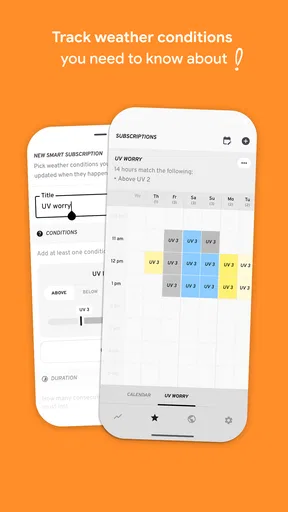
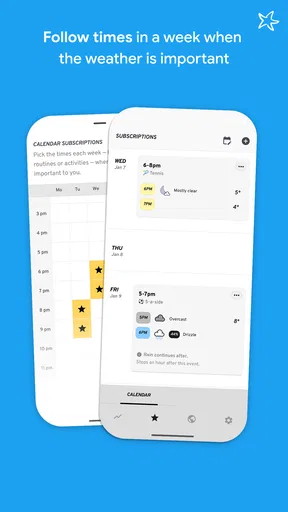
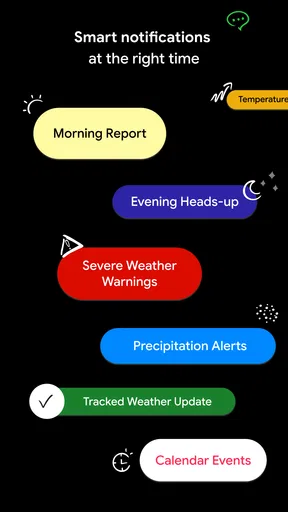
Customization is where Appy Weather shines. You can tweak the settings to get notifications about specific weather conditions. Want an alert when it’s about to rain? Done. Need a heads up for insanely windy days? You got it. And if you’re a night owl or an early bird, you can adjust the notification times to suit your lifestyle.
My practical tip is to choose only the alerts that would actually change a decision. A rain warning can be worthwhile if you walk to work, while a wind alert may matter more if you cycle or have outdoor plans. Too many notifications can turn a helpful forecast into noise, so I’d start with one or two relevant conditions and adjust after seeing how often they interrupt your day.
Another cool trick up its sleeve is the variety of widgets available. Whether you want something simple on your home screen or a more detailed glance at the weather, Appy Weather has got you covered. It’s like having a buffet of weather info right at your fingertips.
A widget can reduce the number of steps between waking up and checking the day, which is useful for someone who glances at a phone with one hand while getting ready. It also puts the forecast in a familiar place instead of asking you to remember to open the app. The trade-off is screen space: a detailed widget may be more informative, but a compact one is less likely to crowd a home screen. I’d try the smallest option that answers your usual morning question, then move to a larger view only if you often need more context.
Using it when attention, movement, or vision is limited
Appy Weather’s short summaries, timeline, and widgets can help in situations where prolonged browsing is inconvenient. If I’m carrying bags, standing in a queue, or trying to keep an eye on a child, a quick glance is easier than navigating several layers of menus. Notification timing can also help when I cannot check the phone regularly, though alerts are best treated as prompts to review conditions rather than guarantees that the weather will unfold exactly as expected.
For sensory comfort, the dark mode option is welcome during a late-night check, particularly in a dim room. It can make the screen feel less glaring, although personal comfort varies and dark screens are not automatically easier for everyone to read. The app’s uncluttered approach may reduce visual distraction, but people who depend on specific contrast settings, enlarged interface elements, or assistive technology should test those combinations directly on their device.
There are also contexts where a phone-based forecast is not enough. If you are driving, do not try to read a timeline or handle notifications on the move; check before setting off or ask a passenger. If you are making a safety-critical decision outdoors, use the app as one source of situational awareness, not as a substitute for local official alerts or direct observation.
Accuracy, version, and realistic expectations
Now, none of these features would mean a thing if the app didn’t deliver on accuracy. But I’m happy to report that Appy Weather is impressively spot-on with its forecasts. It uses data from reliable sources, which means you’re getting the same quality predictions as the big names in the weather game. During my testing period, it nailed the weather changes every single time. It’s like it’s got a crystal ball stashed somewhere in there.
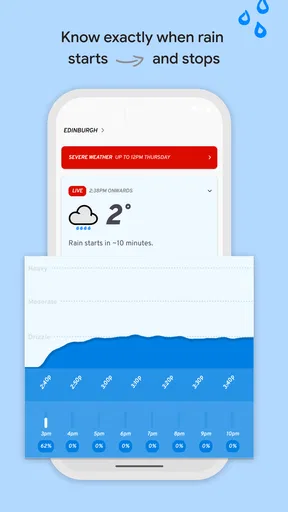
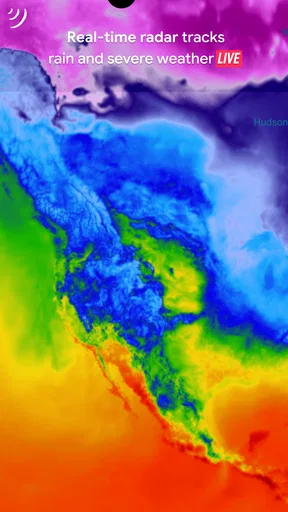
I would not treat any weather app as infallible, especially when showers are local or conditions are changing quickly. A useful habit is to compare the hourly outlook with live radar when a narrow window matters—for instance, deciding whether to take a dog out before a downpour. Appy Weather includes live radar, which gives that check a place within the same weather experience. Forecast detail is helpful, but it should still be read as a changing estimate rather than a guarantee.
The app has been available since June 3, 2019, and the current version is 2.0.18. It has an average rating of 3.2 from around 2.8 thousand ratings, with about 649 written reviews and over 100 thousand installs. Those figures suggest a real audience, but the middling average is a reason to try it for yourself rather than assume the interface will suit everyone. It is free to install, with in-app purchases ranging from $0.99 to $99.99 per item, so I’d check the purchase details in the app before committing to anything. It requires Android 8.0 or later.
How it fits beside other weather options
Compared with the default weather app that comes with a phone, Appy Weather puts more emphasis on a glanceable timeline, configurable alerts, and widgets. That makes it a stronger fit for someone who checks conditions several times a day and wants the details arranged in a quick, approachable flow. In contrast, people who only need today’s high temperature may find a built-in app simpler and see little reason to add another icon.
Against a radar-first weather app, Appy Weather feels more suited to routine planning than to studying storms in depth. Its live radar helps when I want to see what is approaching, but a specialist radar tool may be preferable if tracking precipitation patterns is the main reason I check the weather. I see Appy Weather as a useful everyday companion, not necessarily the one tool for every forecast question.
Usability and user experience
Let’s talk about the user experience. Navigating through Appy Weather is as smooth as butter. The app transitions are fluid, and everything loads up quickly. You won’t find yourself sitting around, twiddling your thumbs while waiting for the app to catch up. It’s optimized to give you the info you need in a snap. Plus, the way it presents data in a simplified manner makes it easy to digest. Weather jargon? Not here!
They’ve also nailed it with the dark mode option—perfect for those late-night weather checks without blinding yourself. It’s these little touches that show the developers really thought about the user experience.
For a realistic weekday routine, I’d check the hourly timeline while deciding what to wear, glance at the widget again before leaving, and let one rain notification cover the part of the day when I’ll be walking. If the radar suggests rain near the time I plan to head home, I can reconsider carrying an umbrella or changing my departure time. That workflow uses the app’s different views for separate jobs instead of repeatedly opening the same screen and hoping for a single definitive answer.
It is not equally well suited to every user. If you want a plain current temperature and nothing more, the extra forecast views and customization may feel unnecessary. If you need accessible controls or a specialized forecast presentation, test the interface with your own settings and assistive tools before relying on it. And if you expect any forecast to be exact down to the street and minute, the app cannot remove the uncertainty inherent in weather.
A thoughtful choice, with a few limits
Appy Weather is best for people who value a quick but meaningful overview: commuters, walkers, parents organizing a day out, and anyone who likes to see how conditions change by the hour. Its timeline can make planning less guesswork-heavy, while its widgets and selective notifications keep useful information close at hand. The blend of readable summaries and live radar gives casual users a path to more detail without making every check feel like a technical exercise.
The main trade-off is that a clean, simplified forecast will not replace every specialized tool. Radar enthusiasts may prefer a more focused radar interface, and users who need particular accessibility adjustments should verify that the app works comfortably with their own device configuration. I also would not enable every alert just because the option exists; a small, relevant set is more likely to help than a steady stream of interruptions.
Final Thoughts
All in all, Appy Weather is a must-have app for anyone who wants to stay ahead of Mother Nature’s whims. It combines style with substance, offering comprehensive weather updates in a package that’s easy on the eyes. Whether you’re a weather geek or just someone who needs to know if you’ll need an umbrella, this app has got your back.
If you’re ready to make your weather checks as enjoyable as checking your social media, give Appy Weather a whirl. You’ll wonder how you ever got by without it. So, go on and check it out—I promise, you won’t regret it!
Verdict
Strengths of Appy Weather: Radar & Widgets
- Sleek, user-friendly interface.
- Customizable weather notifications.
- Accurate, real-time updates.
- Minimalist design with rich details.
- Supports multiple locations.
Limitations of Appy Weather: Radar & Widgets
- Limited free features.
- Ads in the free version.
- Occasional loading delays.
- No radar feature available.
- Subscription required for premium.
Similar Picks in This Category
View All
Weather - By Xiaomi
Xiaomi Inc.4.1

Weather & Radar Forecast
WetterOnline4.8

Weather
OneLouder Apps4.6

AccuWeather: Weather Radar
AccuWeather3.6

The Weather Channel - Radar
The Weather Channel4.6

1Weather Forecasts & Radar
OneLouder Apps4.3
Frequently Asked Questions
What features does Appy Weather offer that make it stand out from other weather apps?
Appy Weather provides a simplistic and user-friendly interface with features like real-time weather updates, hourly forecasts, and a unique timeline view. It integrates seamlessly with your device to offer notifications and widgets, making it convenient to access weather information quickly. This app is designed to be intuitive, catering to users who prefer straightforward navigation.
How accurate are the weather forecasts provided by Appy Weather?
Appy Weather utilizes data from multiple reliable sources to ensure the accuracy of its forecasts. While no weather app can guarantee 100% precision, Appy Weather is known for delivering timely and precise weather updates, including severe weather alerts, which help users plan their activities with confidence.
Is Appy Weather available for both Android and iOS devices?
Yes, Appy Weather is available for both Android and iOS platforms. The app is designed to provide a consistent experience across devices, ensuring that users can enjoy its features regardless of their operating system. It can be downloaded from the Google Play Store and the Apple App Store.
Does Appy Weather offer any customization options for users?
Appy Weather allows users to customize their experience with options to choose different themes and adjust notification settings. Users can also personalize the app's widgets and timeline view to display the weather information they find most relevant. This level of customization makes it versatile for varied preferences.
Is there a cost associated with using Appy Weather, or is it free to download?
Appy Weather is free to download, but it offers in-app purchases for additional features. Users can opt for a subscription to remove ads and access premium features such as extended forecasts and more detailed weather data. This allows users to enhance their experience based on their needs.
